The Cambridge Office Building (COB) offers several conference rooms available to the entire campus community for general meetings and administrative use, as well as dedicated meeting and huddle spaces reserved exclusively for building occupants.
Quick Contact & Support
- Email: cobreceptionist@rice.edu
- Phone: 713-348-7000
- Building Management: cobmanager.edu
Note: Reservation guidelines and policies are subject to periodic updates to optimize processes and better support COB occupants.
First-Floor Conference Rooms
At-a-Glance Overview
- Operating Hours: Monday - Friday, 8:00 a.m. - 6:00 p.m.
- Primary Contact: COB Receptionist (cobreceptionist@rice.edu) | 713-348-7000
| Room Number | Capacity | Room Type | Equipment / Technology |
|---|---|---|---|
| 110 | 20 | Flexible / Multi-Purpose | Podium, Dual TV displays, Mobile Whiteboard |
| 112 | 20 | Flexible / Multi-Purpose | Podium, Dual TV displays, Whiteboards |
| 114 | 16 | Conference Room | Equipped with Crestron Mercury to support Zoom and hybrid conferencing, TV Display, Whiteboard |
| 116 | 14 | Conference Room | Equipped with Crestron Mercury to support Zoom and hybrid conferencing, TV Display, Whiteboard |
Important Exception for Room 110:
Room 110 regularly serves as an active university classroom and follows split booking procedures on weekdays:
- 8:00 a.m. - 12:30 p.m. - Book via the COB Receptionist (cobreceptionist@rice.edu)
- 12:30 p.m. - 5:30 p.m. - Book via the Office of the Registrar (registrar@rice.edu) or submit the online Classroom Request Form
Shared Upper-Floor Meeting Spaces
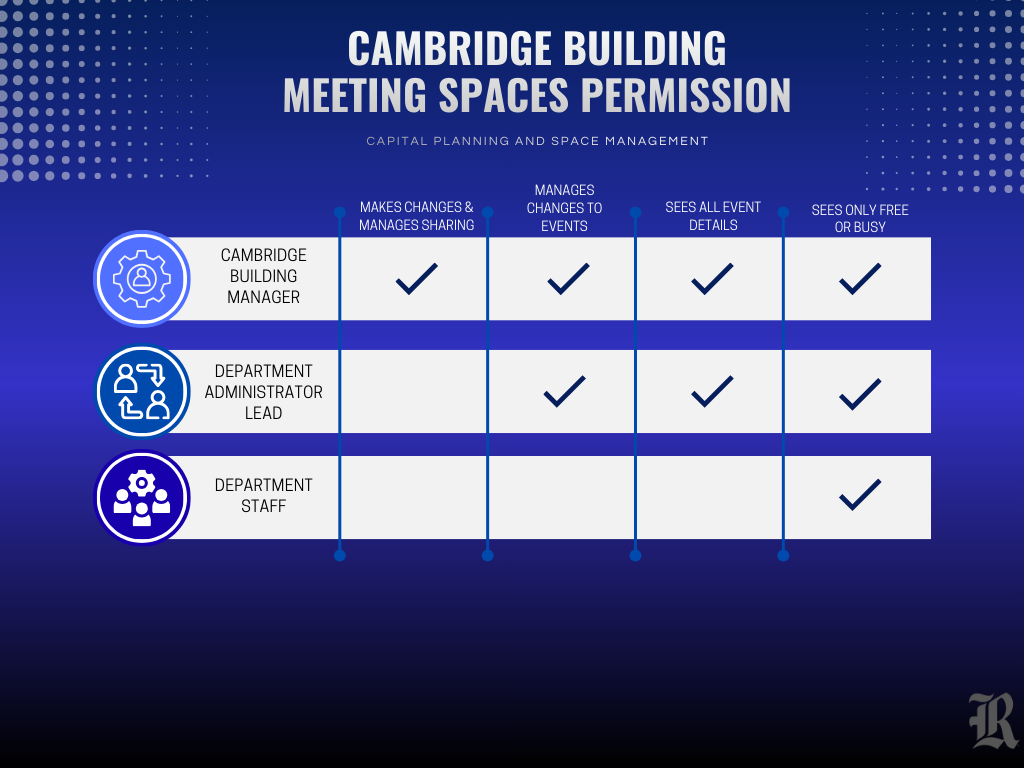
Upper floor spaces are reserved for COB building occupants. While schedules are maintained on Google Calendar, booking and viewing access vary by your role:
- Standard Resident Bookings: Submit all routine reservation requests to cobreceptionist@rice.edu. The receptionist processes the request and updates the Google Calendar.
- Direct Booking Privileges: Direct booking privileges via Google Calendar are granted strictly to the Lead Department Administrators of building occupants for huddle rooms and select conference rooms.
- Calendar Viewing Access: Calendar viewing is managed through specific Google Groups. If you are unable to view room schedules, please contact your department's Lead Administrator to request a Google Group for your department.
Account & Building Management (For Lead Administrators)
Lead Administrative staff should follow the procedures below to manage team access, onboarding, or departmental moves.
- Request Building Access
- Complete the standard Building Access Form
- Submit the completed form directly to cobmanager@rice.edu
- Request a Google Group for your department's calendar viewing access
- Email cobmanager@rice.edu with the following details:
- Department Name
- Current Staff List
- Associated NetIDs
- Email cobmanager@rice.edu with the following details:
Floor Maps & Spatial Directory
Room capacity for each bookable space is displayed in the bottom-right corner of the respective room on the floor maps.
Google Calendar & Meeting Space Permissions Matrix